WE ARE FOOTBALL 2027 Squad Screens Guide: Kader and Spielzeit Explained
All 1. Mannschaft squad screens in WE ARE FOOTBALL 2027: the Kader list with its columns and actions, the squad-planner rating and the Spielzeit promises.
Frequently Asked Questions
What is the difference between the Kader screen and the line-up screen in WE ARE FOOTBALL 2027?
What does Soll mean on the Spielzeit screen?
What does a red contract year in the Kader list mean?
How are the percentages on the Spielzeit screen calculated?
Is buying out release clauses new in WE ARE FOOTBALL 2027?
Why is the goalkeeper's Soll so low on the Spielzeit screen?
Every player decision outside matchday runs through one screen family: the 1. Mannschaft menu. Its Kader tab is the list — who is under contract, what they cost, how happy they are — and the tabs beside it track playing time, loans, relationships, hierarchy, the mood of the dressing room and the personal side of every player. This guide walks the whole family: what each column means, which actions the menu really offers, how the squad planner grades you, and how the Spielzeit tab holds you to the playing time you promised.
What is the squad (Kader) screen in WE ARE FOOTBALL 2027?
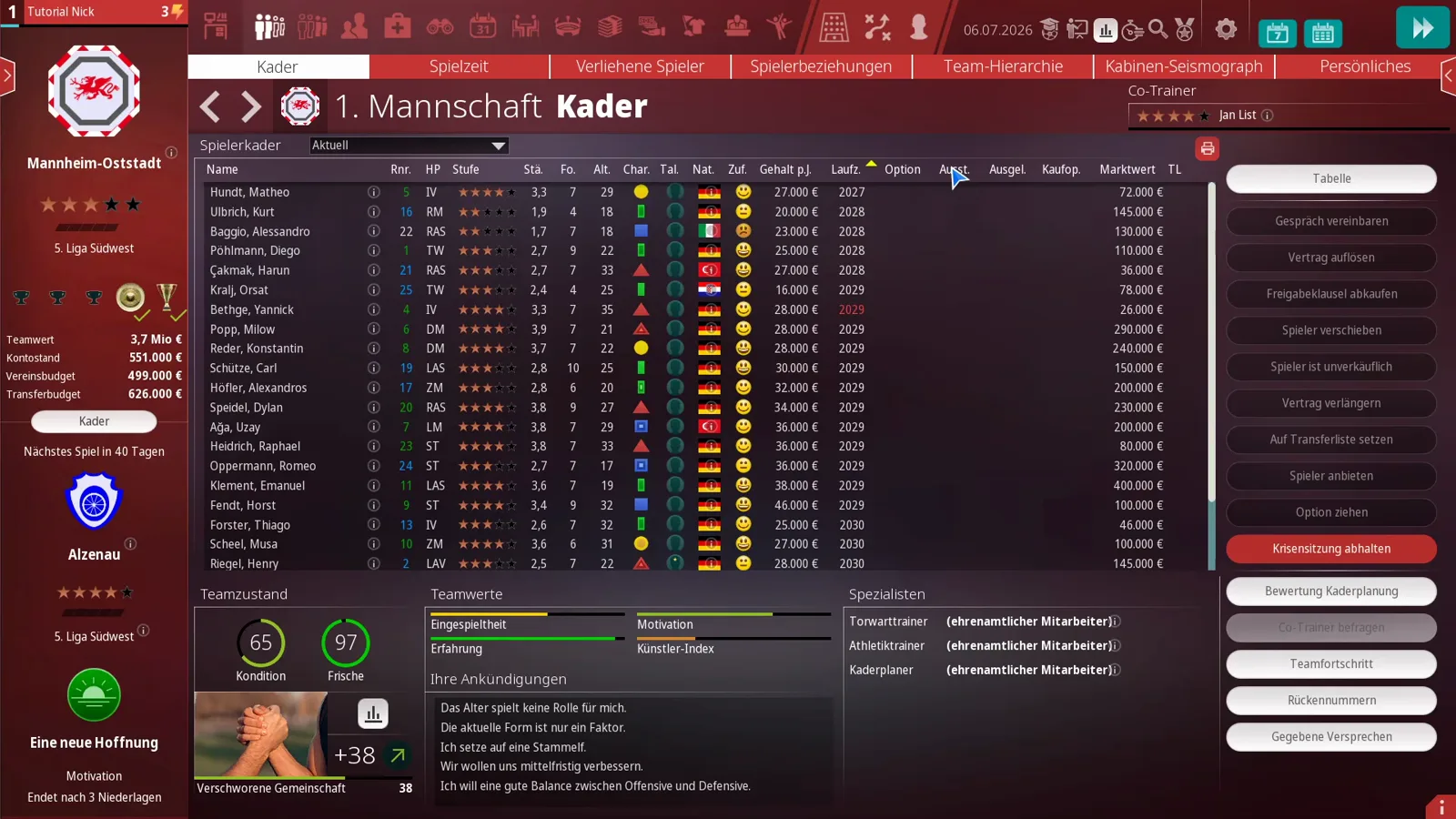
The squad screen — the game calls it Kader — is the roster view of your first team: a sortable list of every contracted player plus a right-hand rail of squad actions, a team-state block underneath and a dropdown above the list that switches the view. The author first clicks that dropdown to make the point that this is the current squad — not the squad for the next transfer period, not next season’s, not the loan-only view, which shows an empty list in his save. The assistant coach sits in the top right with his star rating, and the tab row above — Spielzeit, Verliehene Spieler, Spielerbeziehungen, Team-Hierarchie, Kabinen-Seismograph, Persönliches — is the rest of this guide.
Setting up the eleven itself is a different screen: our lineup screen guide covers formation, position grid and set pieces. And at the foot of the right-hand rail sits Gegebene Versprechen — the list of promises you have handed out. The giving side of that ledger, one pre-match dialog per player, is walked screen by screen in the player promises guide.
Which columns and filters matter on the Kader list?
Left to right you get: Name, Rnr. (squad number — blue means bench, green means currently on the pitch, per the author), HP (main position), Stufe, Stä. (strength — which he stresses is calculated from the level, not from the individual skills you see elsewhere), Fo. (form), Alt., Char., Tal., Nat., Zuf. (a mood smiley), Gehalt p.J. — salary per year, not per month — Laufz. (contract until), Option, Ausst. (release clause), Ausgel., Kaufop., Marktwert and TL (transfer list). Sort by any column: sorting by salary shows his striker on 46,000 € a year and the second goalkeeper at the top of the ascending list on 16,000 € — semi-professional money, as he notes.
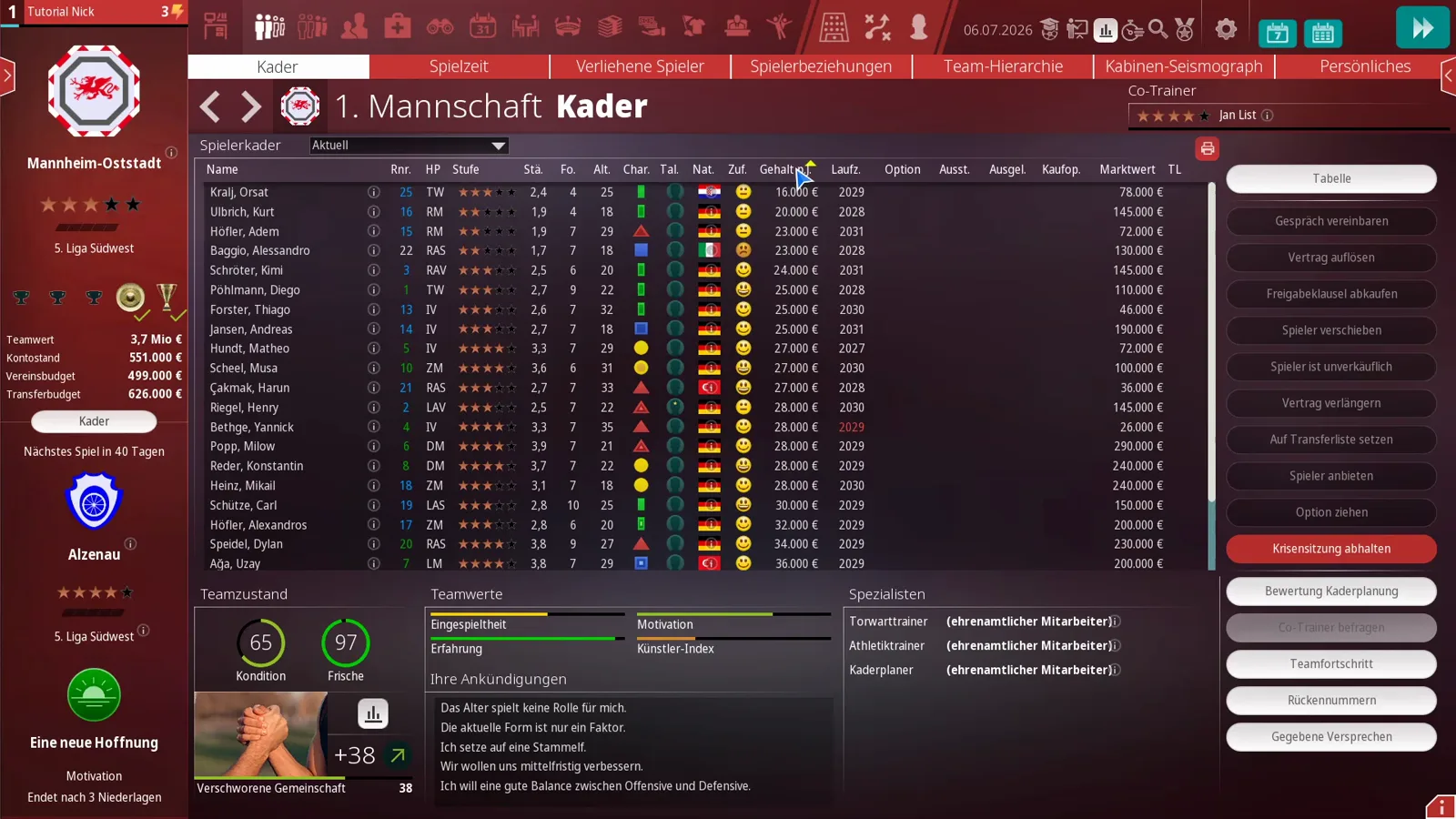
One warning from the video: this list shows no secondary position column — unlike the transfer-side squad screen from his previous episode. Selling “one of three right wingers” from this screen alone can backfire, because you cannot see here whether the redundant player is also your only backup somewhere else. Double-check the player profile, where player types and roles are shown in full, before you sell. And read the contract year carefully: the red 2029 next to one of his defenders marks a planned career end — that player will retire, will not extend and is effectively untransferable.
Which actions run from the squad menu?
The right rail carries the whole toolkit: Gespräch vereinbaren (book a talk — it lands in the calendar), Vertrag auflösen (terminate — in the video the player laughs and answers that they would have to pay him 66,000 €, take it or leave it), Freigabeklausel abkaufen (buy out a release clause — new in WE ARE FOOTBALL 2027, priced by a formula printed in the manual), Spieler verschieben (move a player to another squad), Spieler ist unverkäuflich (blocks inquiries, may anger the player), Vertrag verlängern, Auf Transferliste setzen, Spieler anbieten, Option ziehen and the red Krisensitzung abhalten, which the author says only becomes available in real crises and seems to be offered about once a year. Below sit Co-Trainer befragen, Teamfortschritt, Rückennummern and Gegebene Versprechen — that last one lists every playing-time promise you have made; an empty list, as in the video, means you have promised nobody anything. Promises, clauses and demands are the raw material of negotiations — our contract negotiations guide goes deeper.
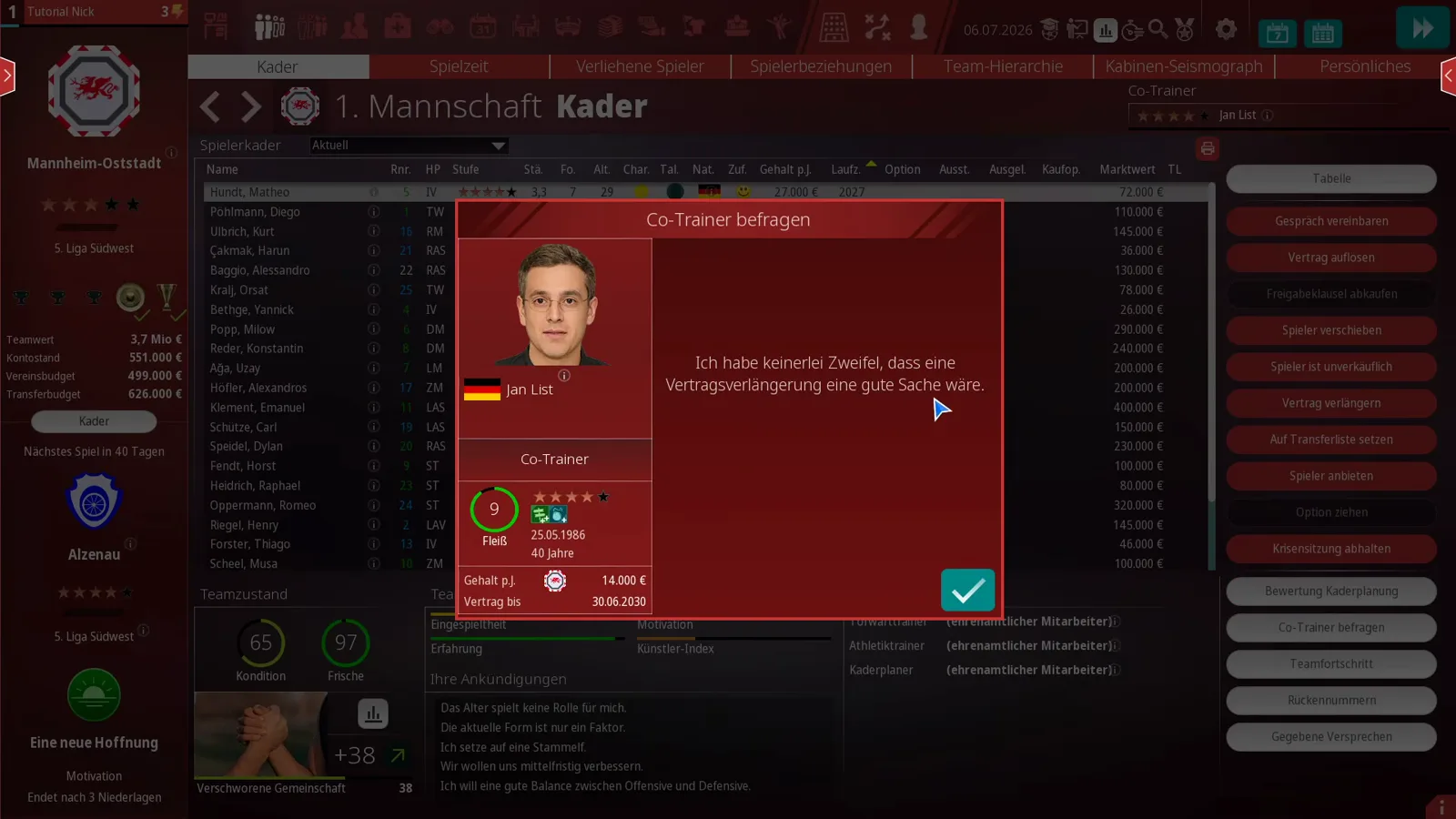
Co-Trainer befragen turns your assistant into an advisor: in the frame he endorses extending a player’s contract. The author treats the assistant’s star rating as the quality cap of this advice.
How does the squad planner rate your squad?
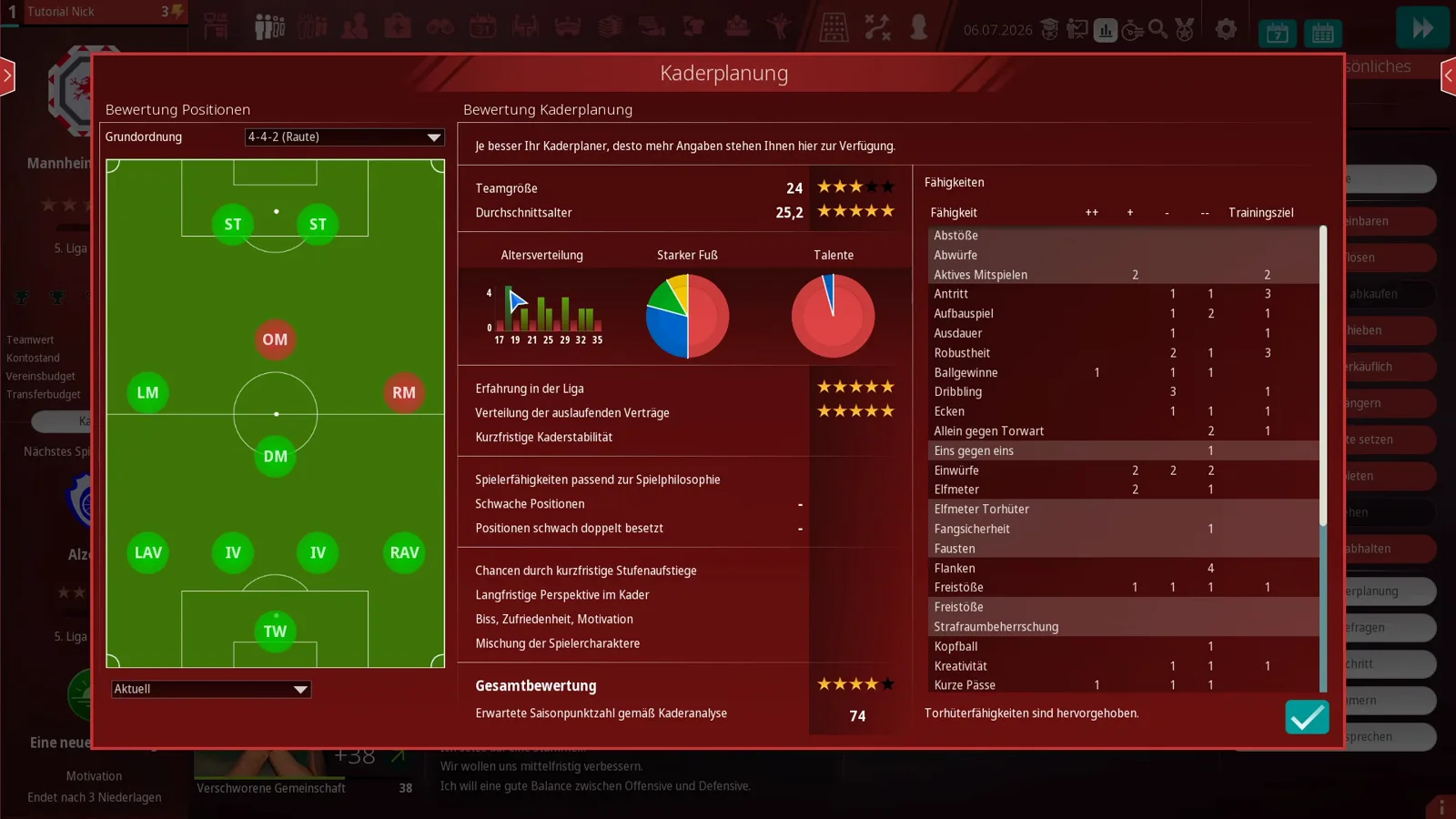
Bewertung Kaderplanung opens the Kaderplanung screen, and it is the closest thing the game has to a squad report card. On the left, a pitch in your base formation flags positions that are short or over-full — in his save attacking midfield and right midfield glow red. On the right it grades structure: squad size 24 rated three stars (he suspects 25-26 would score better, and a third goalkeeper is missing), average age 25.2 rated five stars, an age histogram, league experience and the spread of expiring contracts both at five stars, down to an overall rating of four out of five and an expected season points value — 74 for this squad. His reading: finish below that number and the coaching was the problem; his relegation-battling other save expects 30. How much of this you see depends on your Kaderplaner — in his save a volunteer, so parts of the panel stay grey. If your age structure is the weak line, youth is the fix: our scouting and youth guide shows where talents come from.
What do the team-value bars under the list mean?
Below the list, the Teamwerte block shows four bars: Eingespieltheit (how long the currently selected players have been at the club and played together — recent matches count too; it matters for passing, in the author’s words: uncoordinated players pass where nobody runs), Erfahrung, Motivation (the squad average) and Künstler-Index. The Erfahrung tooltip is the clearest one in the game: 4,000 matches played count as 100% and a full bar, and the value reduces the performance fluctuations of a team — a young squad plays one top game and then one flop, an experienced one stacks solid weeks.
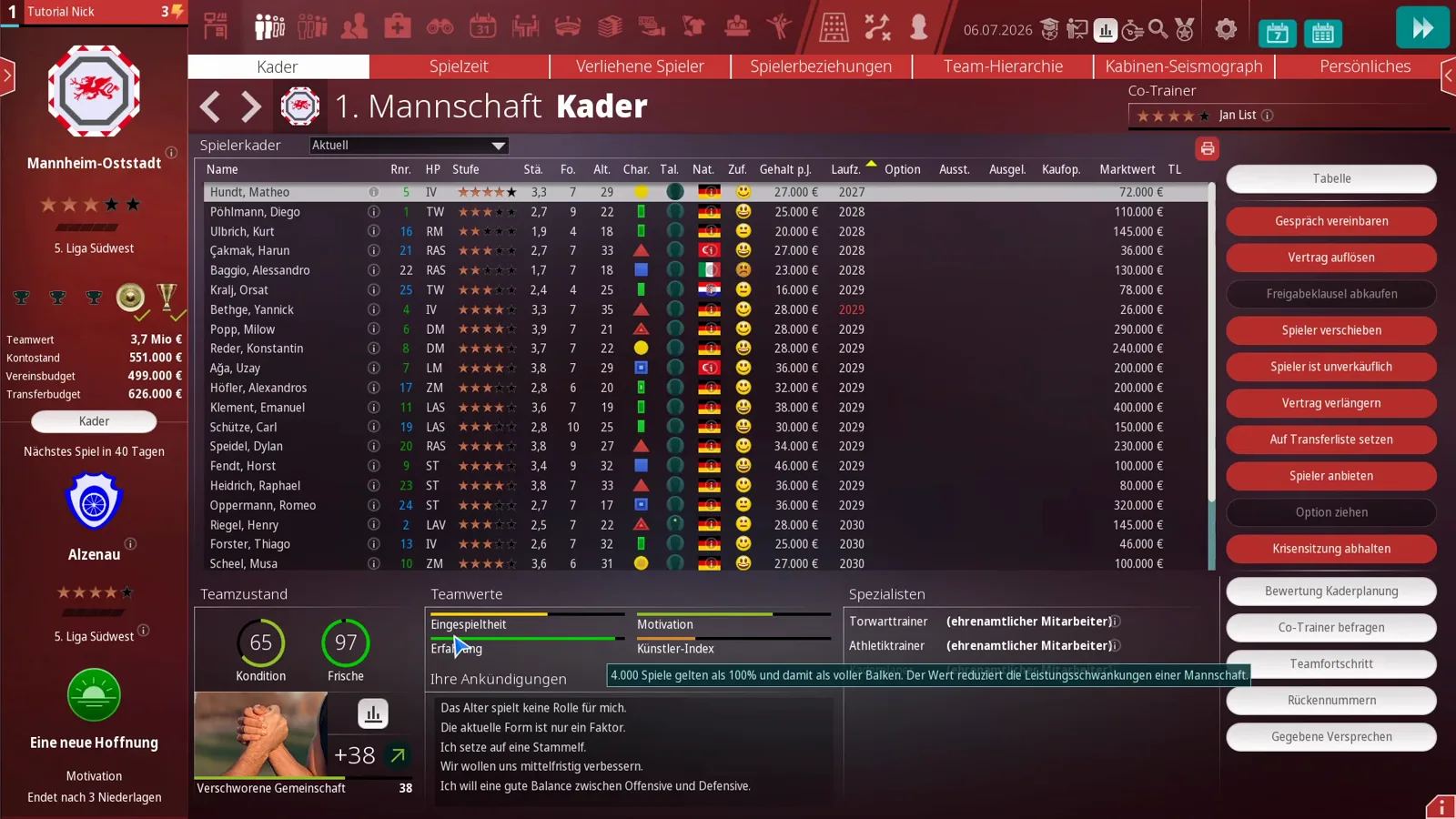
The Künstler-Index gets an honest correction in the video: the author admits he misread it for years, then quotes the in-game text — it shows how much creative potential is on the pitch, an extremely low value is negative, a high value needs tactics that use it, and the value itself has no effect; it is a suggestion. His own rule of thumb: never be proud of a full bar.
What does the Spielzeit screen promise?
The Spielzeit tab is the promise ledger. Each player row carries Ist (playing time actually received) and Soll (the share promised to him), with bar charts between the columns. Before a ball is kicked, Ist sits at 0% with the note Noch keine Bewertung, while Soll spans the whole squad: in the video’s save the second goalkeeper is promised 5%, backups and rotation candidates climb through 15-50%, and the biggest promises in the squad sit at 85-90%. The author’s advice is to read these as commitments you will be held to — and to check them before contract talks, because a promise made here outlives the honeymoon. He also notes that very young players, around 18, generally expect less playing time than established pros — per his reading of the guide, not an official table.
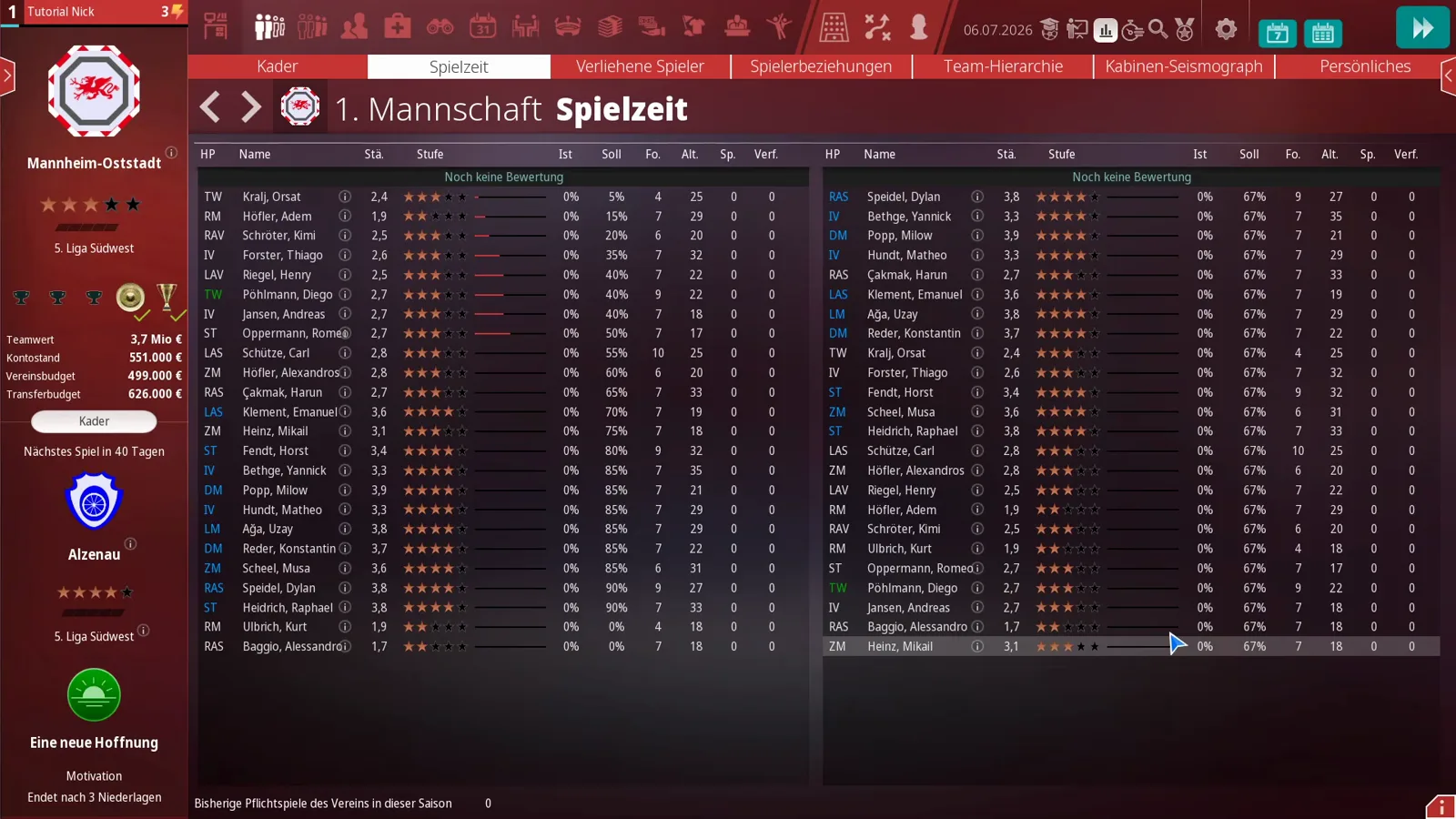
One honest gap: parts of the screen resist even the author. In his fresh save the second column shows a flat 67% for every player, some rows show no bar at all, and he openly says he does not yet know what those values derive from — he suspects an Early Access quirk and promises no explanation the game has not given him.
How does playing time affect satisfaction?
Once the season runs, the same screen becomes a report card on your promises. His half-season Göppingen save sorts the squad into labelled groups: Hat viel mehr gespielt als erwartet (played far more than expected), Hat mehr gespielt als gedacht, Spielzeit wie erhofft (as hoped) and Zu wenig gespielt (too little), with a second view splitting Stammspieler from Keine Stammspieler. The star example sits at the top: Rafael Mader has played 63% against a promise of 0% — nobody is happier than an over-delivered teenager.
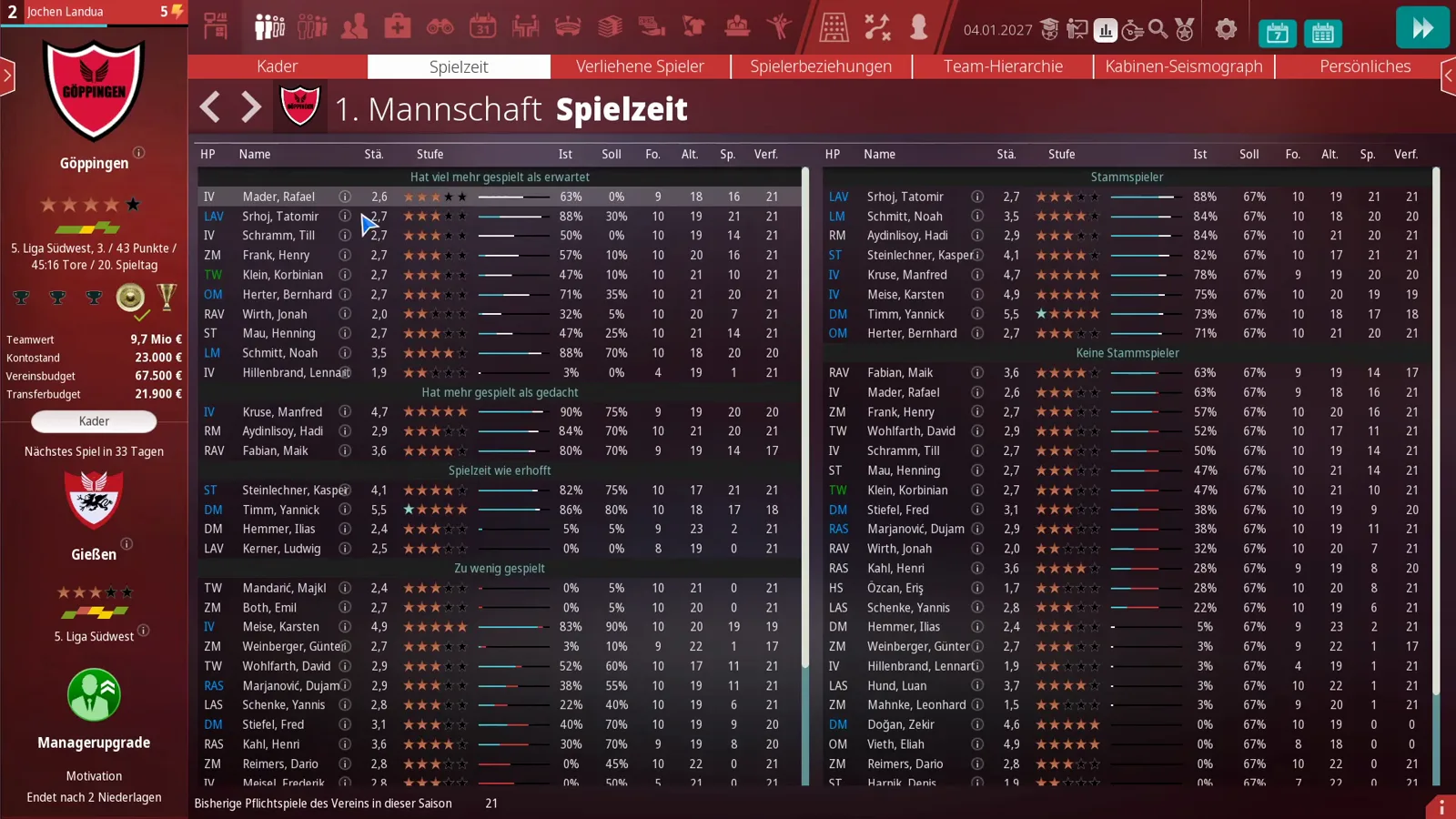
The bottom group is your trouble list, and the video is blunt about it: players who receive clearly less than promised become dissatisfied, and chronic dissatisfaction is where our morale and satisfaction guide takes over. The fix is rotation — actually fielding the promised players — which happens on the lineup screen. Two quirks from the video, both flagged as his observations: a player bought in winter after a loan starts from zero (his loan minutes do not count), and the numbers appear to rate league matches only, with the cup game not counted.
What do the percentage dials in a player profile mean?
Open a player from the list and the Motivation tab of his profile shows the same story per player as three dials: Startelf-Quote (share of matches in the starting eleven), Gespielte Minuten (share of minutes played) and Torbeteiligungen (goal involvements). Rafael Mader shows 70% starts, 44% minutes, 6% goal involvements; Tatomir Srhoj shows 100%, 86% and 13% — plus a satisfaction bonus of +0.2 on playing strength and the verdict Der Spieler ist glücklich. The situation factors beneath are readable at a glance: Mader’s Has too much competition -2 against a long contract +1; Srhoj’s Is a regular +1 and club success +2.
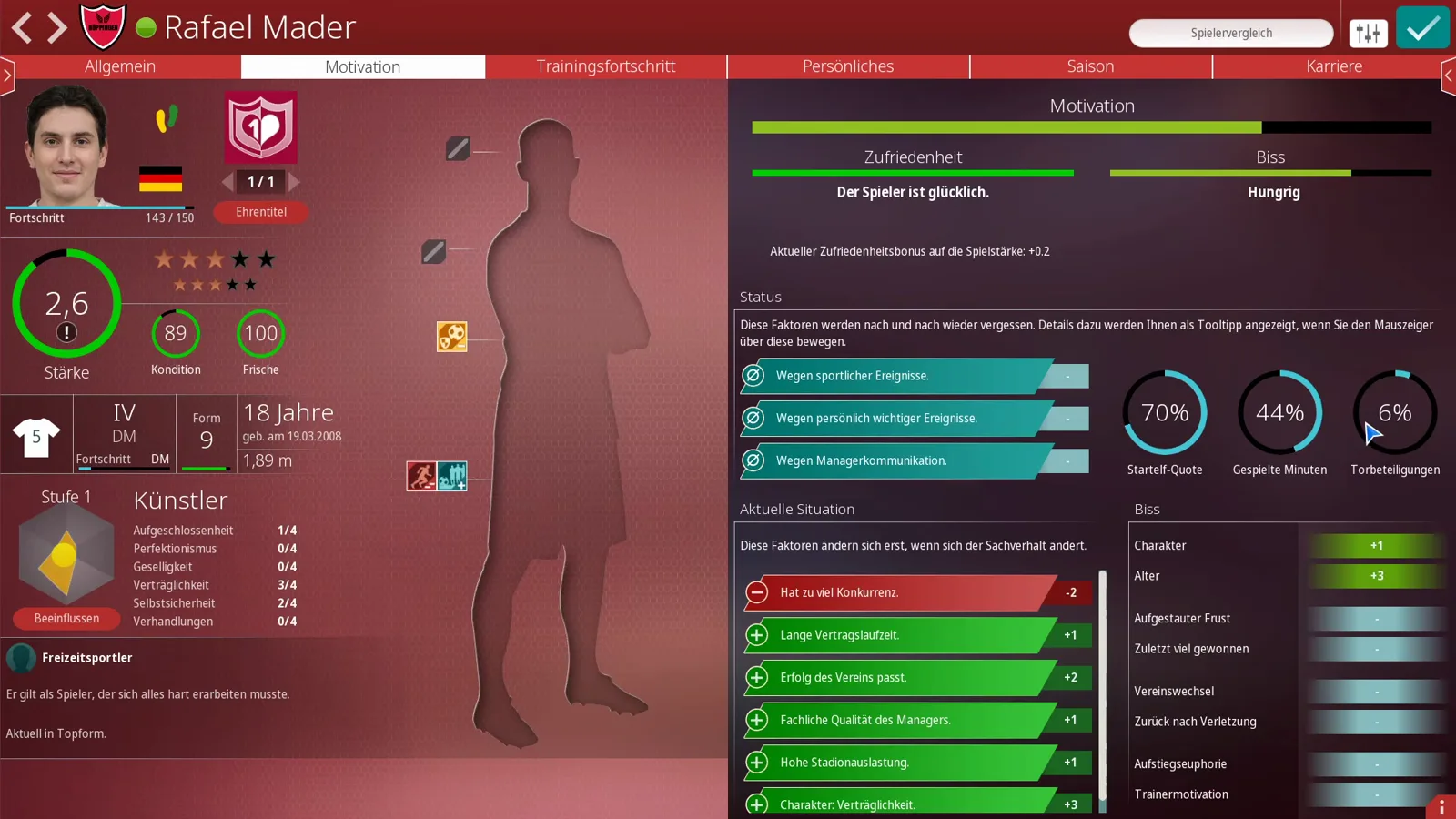
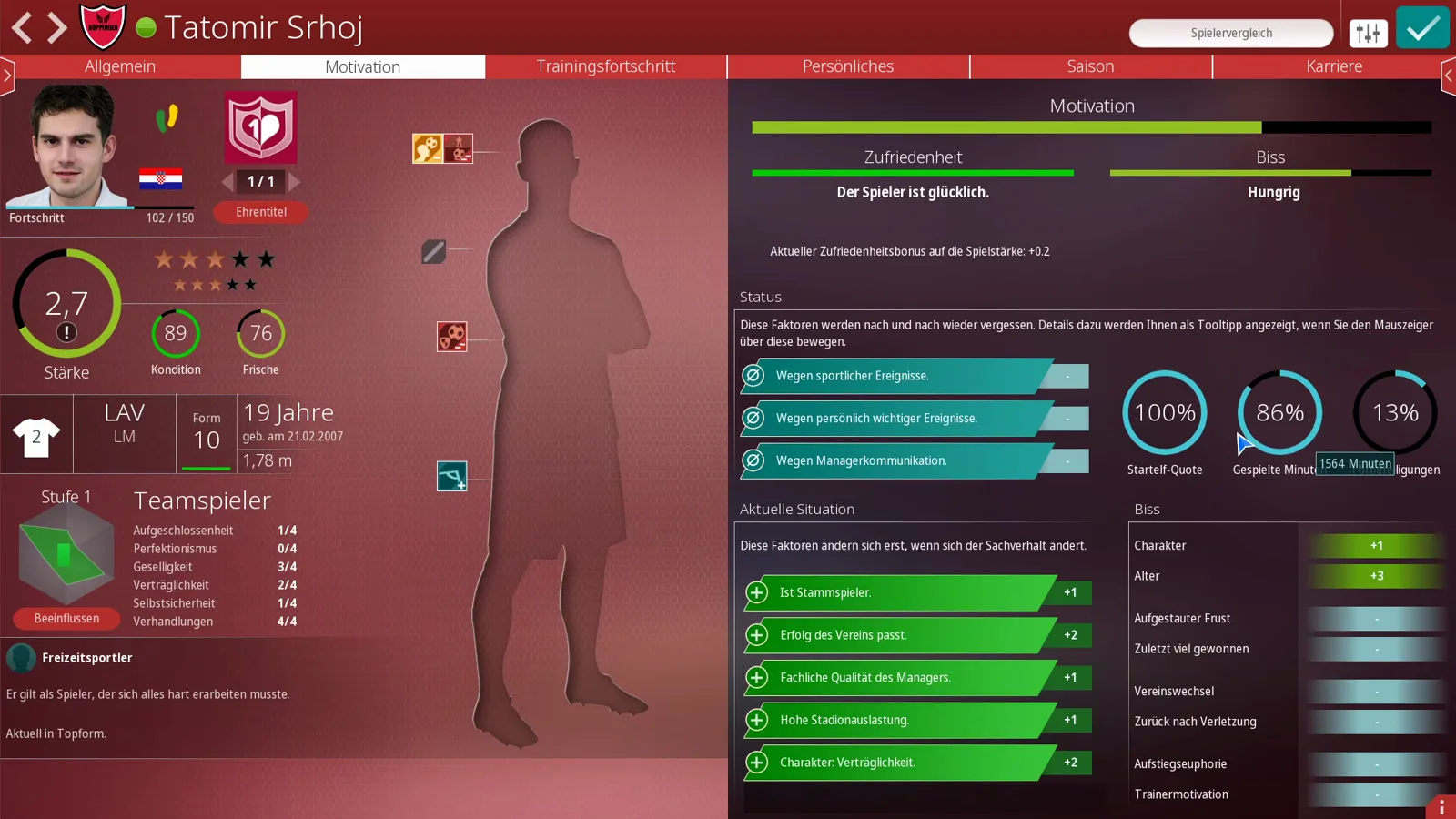
How the overview percentage relates to the three dials is genuinely unresolved: the manual, the author reports, states what Ist and Soll are but not how they are computed, and his guess that the row value blends starts and minutes is exactly that — a guess. The dials themselves, at least, are printed on the screen.
What else lives in the squad screens?
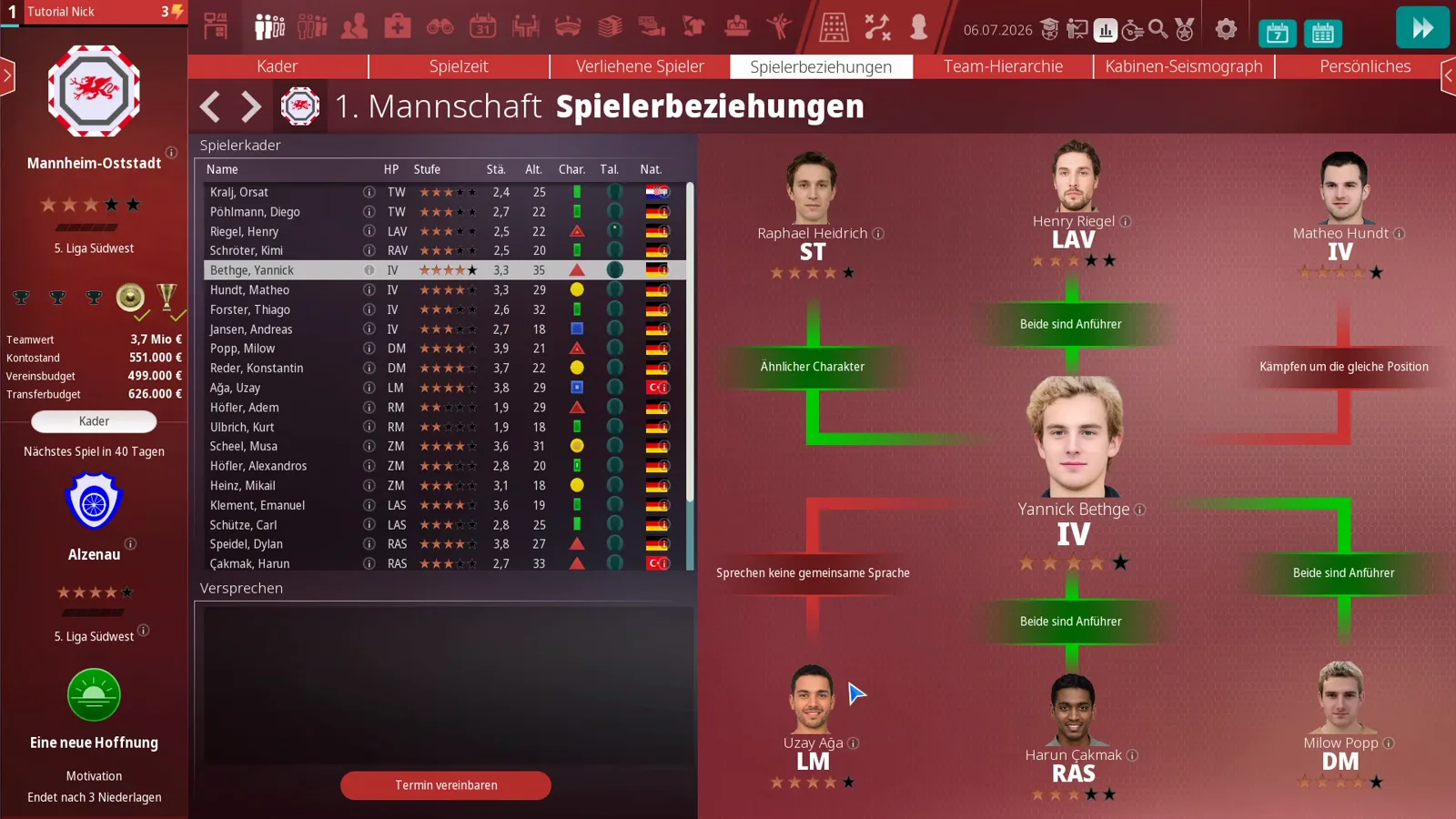
The remaining tabs round out the dressing room. Verliehene Spieler lists your loanees. Spielerbeziehungen draws the social graph — green links for a similar character, two leaders or shared training goals, red for fighting over the same position or no common language; the author’s reading: one player with all-red links may be your problem, and language gaps you can fix by teaching. Team-Hierarchie stacks the pecking order from leaders to outsiders and warns implicitly that selling a leader bites harder — a club can also pay 10,000 € for a psychological team profile. Kabinen-Seismograph plots pro- and anti-manager camps, quiet lines are fine, spikes mean talk — and the screen personalises the split: in the save below both camp headers riff on the manager’s name, the pro camp reading Pro-von Angespielt-Lager while the anti camp marches under the mocking banner Leider-sitzt-von Angespielt-fest-im-Sattel-Lager and currently reports Derzeit niemand — nobody at all. Persönliches finally adds satisfaction emojis, hobbies and your own observations, which fill up faster the better your game-assessment skill is.
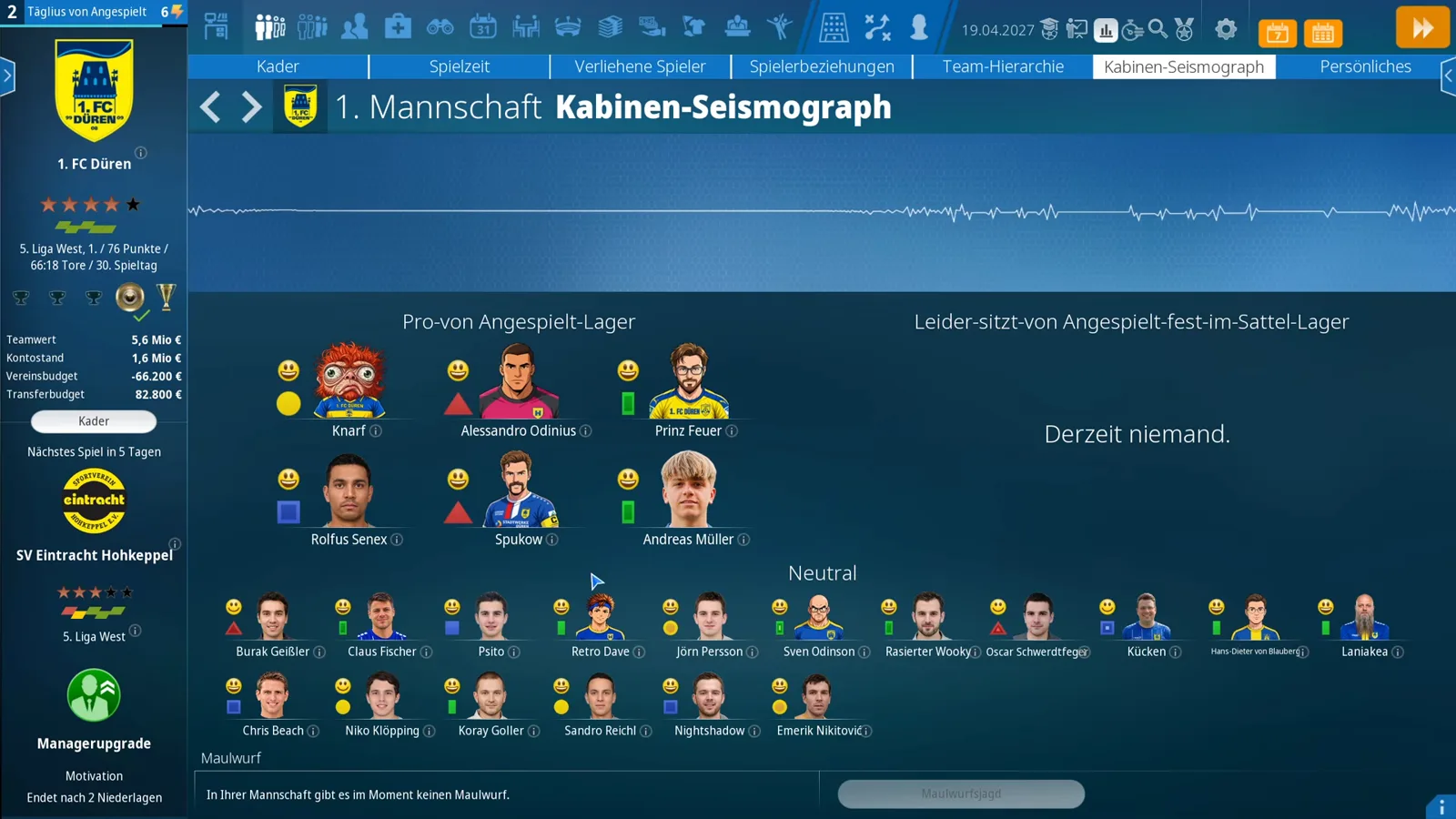
One more row at the bottom of that screen is worth knowing: Maulwurf, the mole. The game states outright whether one currently works against you — in the frame above it reads In Ihrer Mannschaft gibt es im Moment keinen Maulwurf, there is no mole in your team at the moment, and the Maulwurf jagen hunt button stays greyed out while there is nothing to hunt.
That is the full circuit of the first-team screens. Squad depth is a squad-planning question — our second team guide shows where the next man comes from — and if the dressing room has already turned, the morale guide tells you how to win it back.
Related Guides
guides
WE ARE FOOTBALL 2027 Team Strength Comparison: Stars, Gauges, Scouting Lists
How to read team strength in WE ARE FOOTBALL 2027: Kader stars, the profile gauge, the pre-match Mannschaftsteile bars and the scouting list for the next fixture.
guides
WE ARE FOOTBALL 2027 Season Planning Guide: Budget Split, Kits and Squad Numbers
The Saisonplanung stretch in WE ARE FOOTBALL 2027 screen by screen: promotion payout, league target, budget split, new kits, club rules and squad numbers.
guides
WE ARE FOOTBALL 2027 Relegation Battle Guide: Escaping the Red Rows
A relegation battle in WE ARE FOOTBALL 2027 screen by screen: the red Verbandsliga table rows, a 0:1 away steal, a 1:4 home defeat and the January deals in between.
Was this helpful?
Thanks for the feedback!