WE ARE FOOTBALL 2027: Install, First Launch & New-Game Setup Guide
How to install WE ARE FOOTBALL 2027 on Steam and start your first save: language choice, database scope, manager creation, difficulty and club selection.
Frequently Asked Questions
Which languages does WE ARE FOOTBALL 2027 support on first start?
Can I add the real-name database to a save I already started?
What is the difference between Realistischer Modus and Kreativmodus?
WE ARE FOOTBALL 2027 needs no launcher dance, no compatibility patches and no mod kit to get running: you install it from Steam like any other Windows release, and every meaningful decision is packed into the first ten minutes after you press Play — language, database scope, game mode, manager profile, difficulty and club. This guide walks through each of those screens in order, with the German menu names you will actually see, so nothing in the wizard surprises you.
Installing the Game on Steam
The game went on sale on 16 September 2026, developed and self-published by Winning Streak Games GmbH — the copyright line in the main menu says exactly that. It is a Windows title through and through: the store page asks for 64-bit Windows 10 and DirectX 12, and there is no macOS, Linux or console build to look for. If you are unsure whether your machine qualifies, our system requirements and compatibility guide walks through every line of the store listing.
The install itself is ordinary Steam business: buy the game (it lists for about €20, deliberately cheap because the developers skipped club licenses), open your Library, hit Install and pick a drive when Steam offers one. No storage figure is published anywhere official, so nobody can tell you the exact download size — and note that saves and database files do not stay in the Steam folder anyway: the manual places them under Saved Games\We Are Football in your Windows user profile (EN p. 179 / p. 215), which matters once you start backing things up.
First Launch: Language, Sound and Window Mode
Once the game is running, its screens come faster than they should. The controls and menus guide maps the icon bar, the side menus and the place inside the game where the full key list is documented.
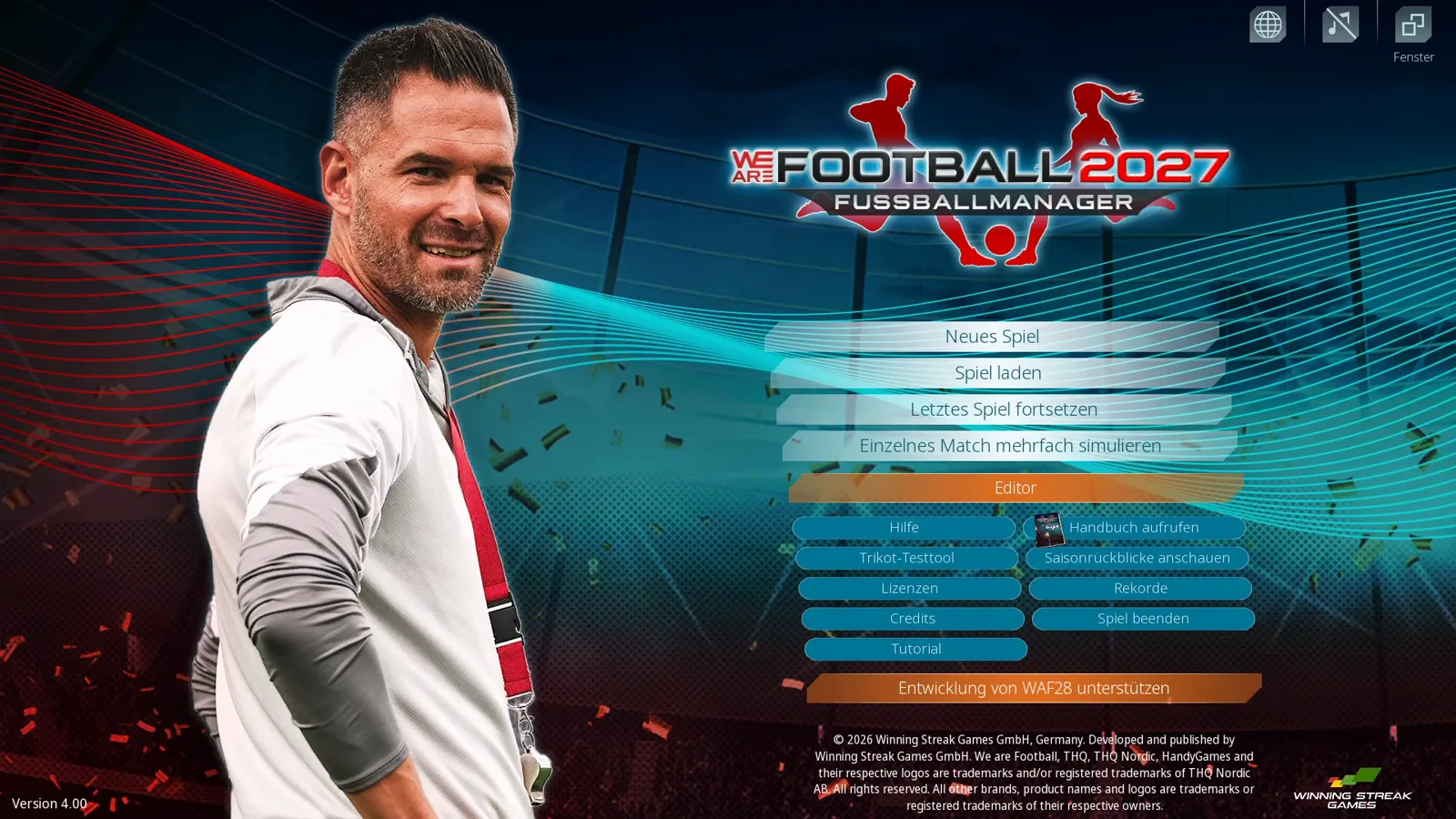
The main menu is where you land. The important buttons for day one: Neues Spiel starts the new-game wizard, Spiel laden opens existing saves, Letztes Spiel fortsetzen jumps straight back into your career, and Handbuch aufrufen opens the official PDF manual (foreword by Gerald Köhler) — 321 pages of tables and explanations that remain the deepest reference for the game; the official manual guide maps every chapter and pairs it with a guide on this site. The row of small icons in the top-right corner does three jobs, and all three fix a classic first-start annoyance: the globe opens the language dialog, the crossed-out note mutes the menu music, and the button labelled Fenster toggles between fullscreen and windowed mode.
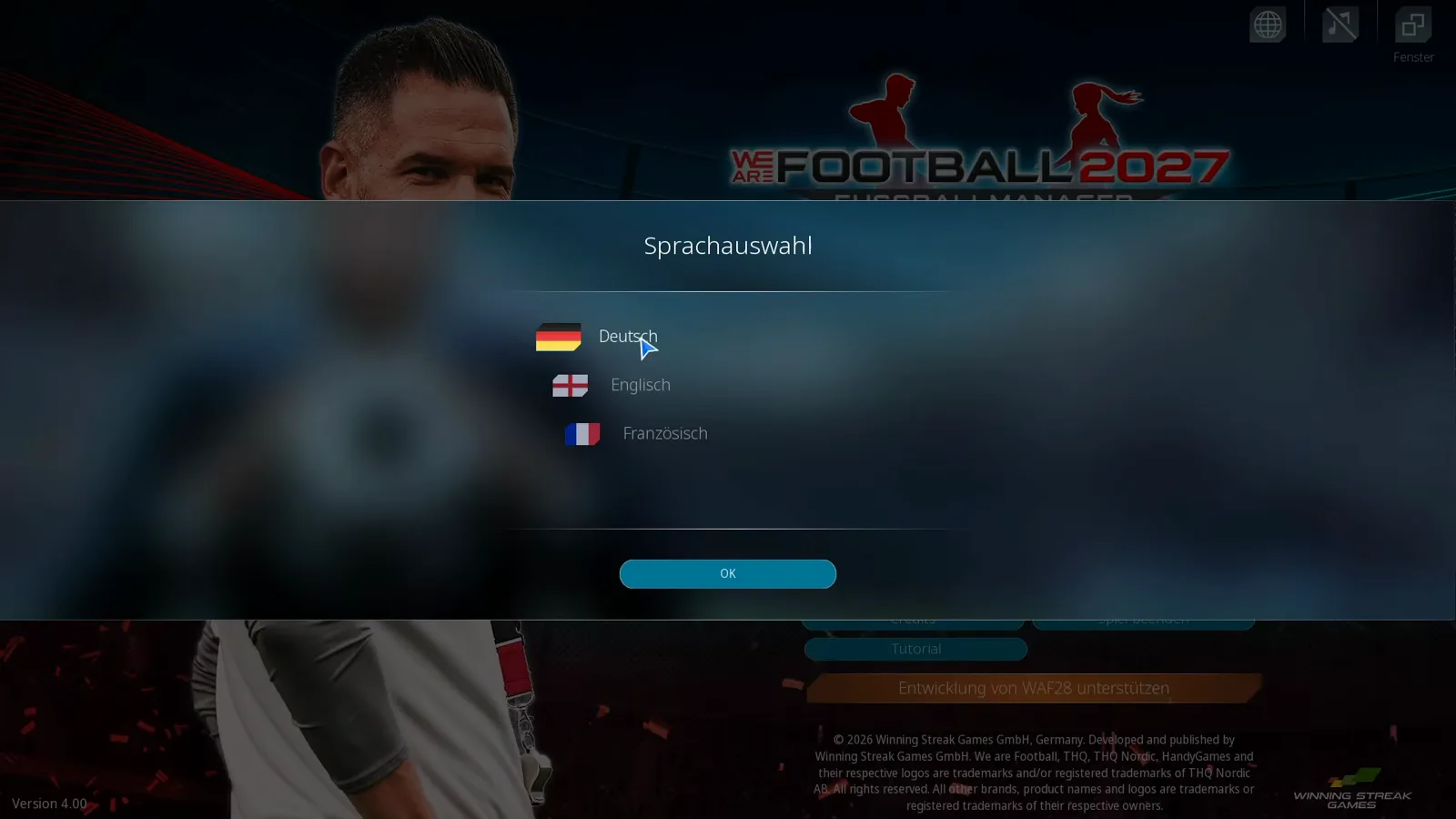
Click the globe and the Sprachauswahl dialog gives you exactly three choices: Deutsch, Englisch, Französisch — the launch version’s interface languages, and the ones Steam listed at release. Pick one, confirm with OK, and the whole interface switches. Update 3 (14 October 2026) has since widened this screen with a „New language selection screen“: Italiano joined as a fourth official language, an Austrian German variant arrived, and the game „directly supports“ fan language files for up to 30 languages, „e.g. Spanish, Portuguese or Turkish“ — so a post-update install may offer more than the three buttons below. Also on that menu: Einzelnes Match mehrfach simulieren simulates a single fixture hundreds of times, the Tutorial button opens an in-game primer, and the orange Entwicklung von WAF28 unterstützen strip leads to the developers’ voluntary support page — it is a donation thing, it sells no content and it can be ignored safely.
Choosing the Database Scope: Simulated Countries
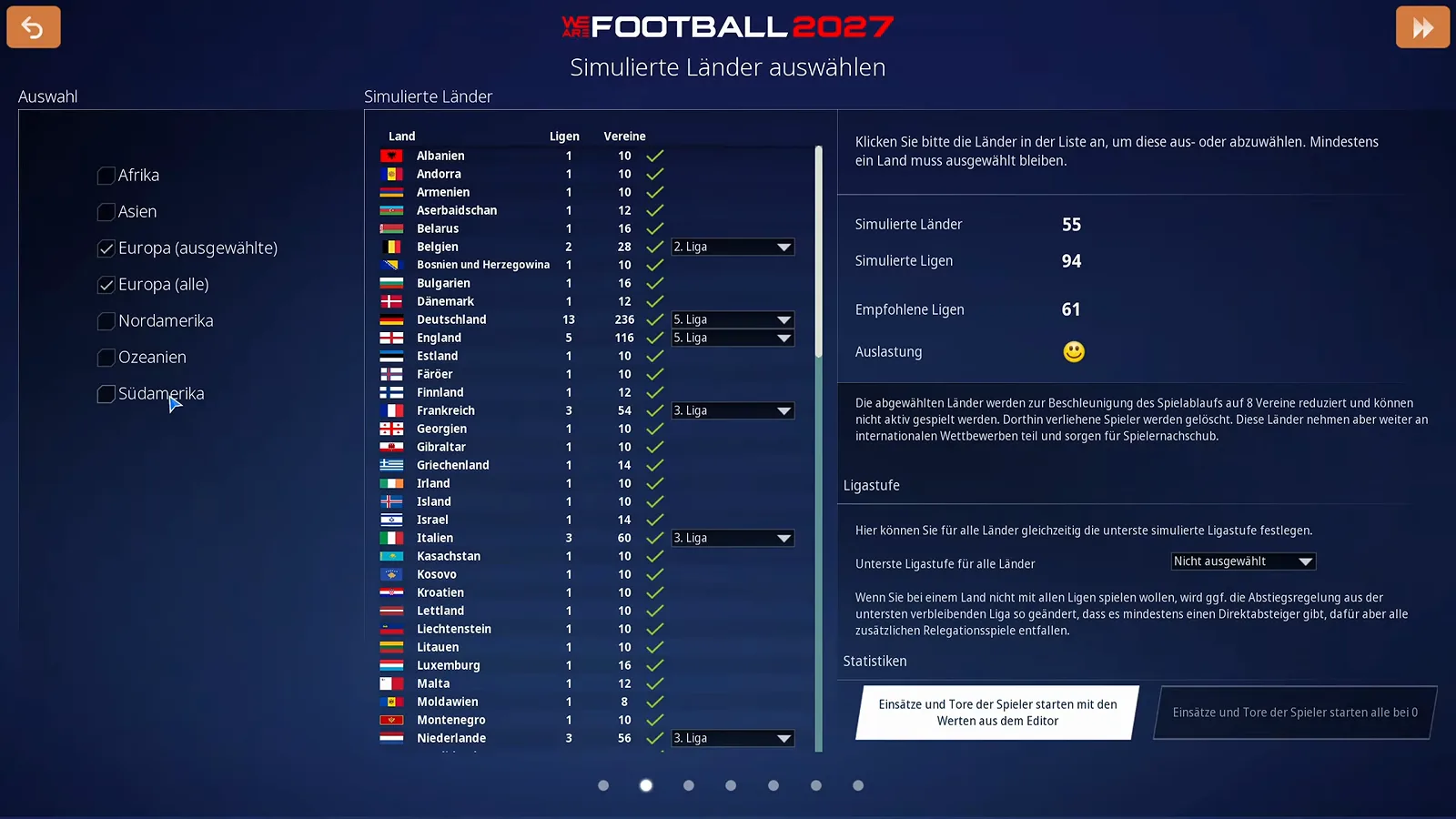
Starting a new career first asks how much world you want. Which of the two you should pick is a real fork in the road, not a formality: standard or world database at career start compares load, reach and what the smaller set cannot do. The game ships with two men’s-football databases — Standard, roughly the Europe-focused scope of the predecessor, and Welt with more than 200 countries — and after picking one, the Simulierte Länder auswählen screen lets you trim it. Every country you deselect is reduced to eight clubs and can no longer be played actively, but it keeps simulating, still enters international competitions and keeps producing players for your transfer market. At least one country has to stay selected. Per country you can also set the lowest league that gets simulated in detail, and two buttons at the bottom decide whether player appearance and goal statistics start from editor values or from zero.
The presenter’s advice in the source video is sound: be generous with the off switch. If you know you will only ever manage in Europe, deselecting whole continents speeds the simulation up noticeably, and the scaled-down rest of the world still feeds players and international results into your save.
Realistischer Modus or Kreativmodus?
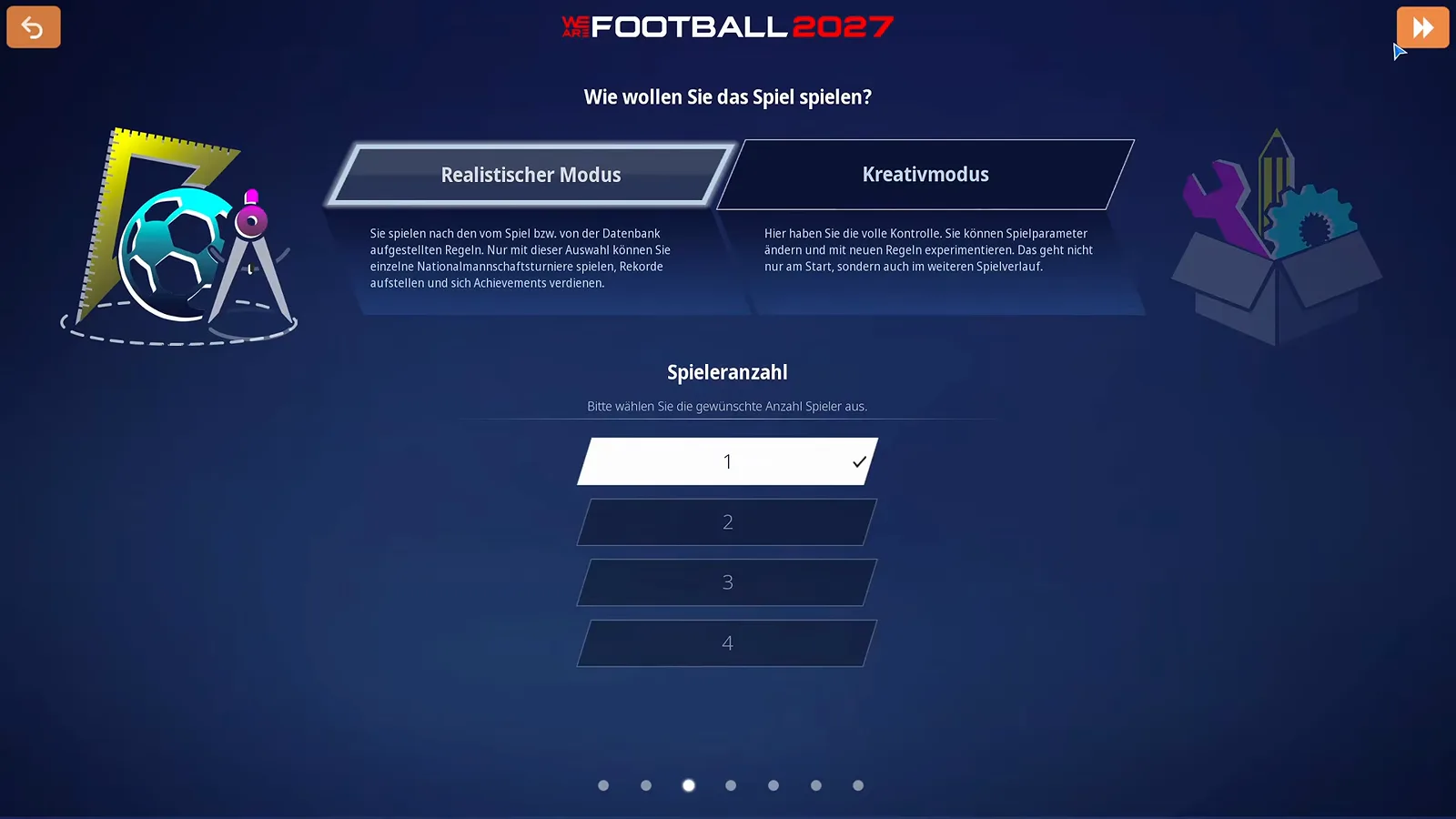
The third wizard step is a two-card question: Wie wollen Sie das Spiel spielen? The card text draws the line clearly. Realistischer Modus plays by the rules the game and database set — and only this mode lets you play individual national-team tournaments, set records and earn Steam achievements. Kreativmodus hands you full control over game parameters, and unlike the classic editor sandbox you can keep changing the rules during the save, not just at the start. Achievements hunters and anyone planning a long, honest career picks the left card; tinkerers pick the right one.
On the same screen, Spieleranzahl sets how many people play this save — one to four, on one PC, which is Steam’s shared-screen multiplayer for up to four managers. For a normal career you leave it at 1.
Creating Your Manager
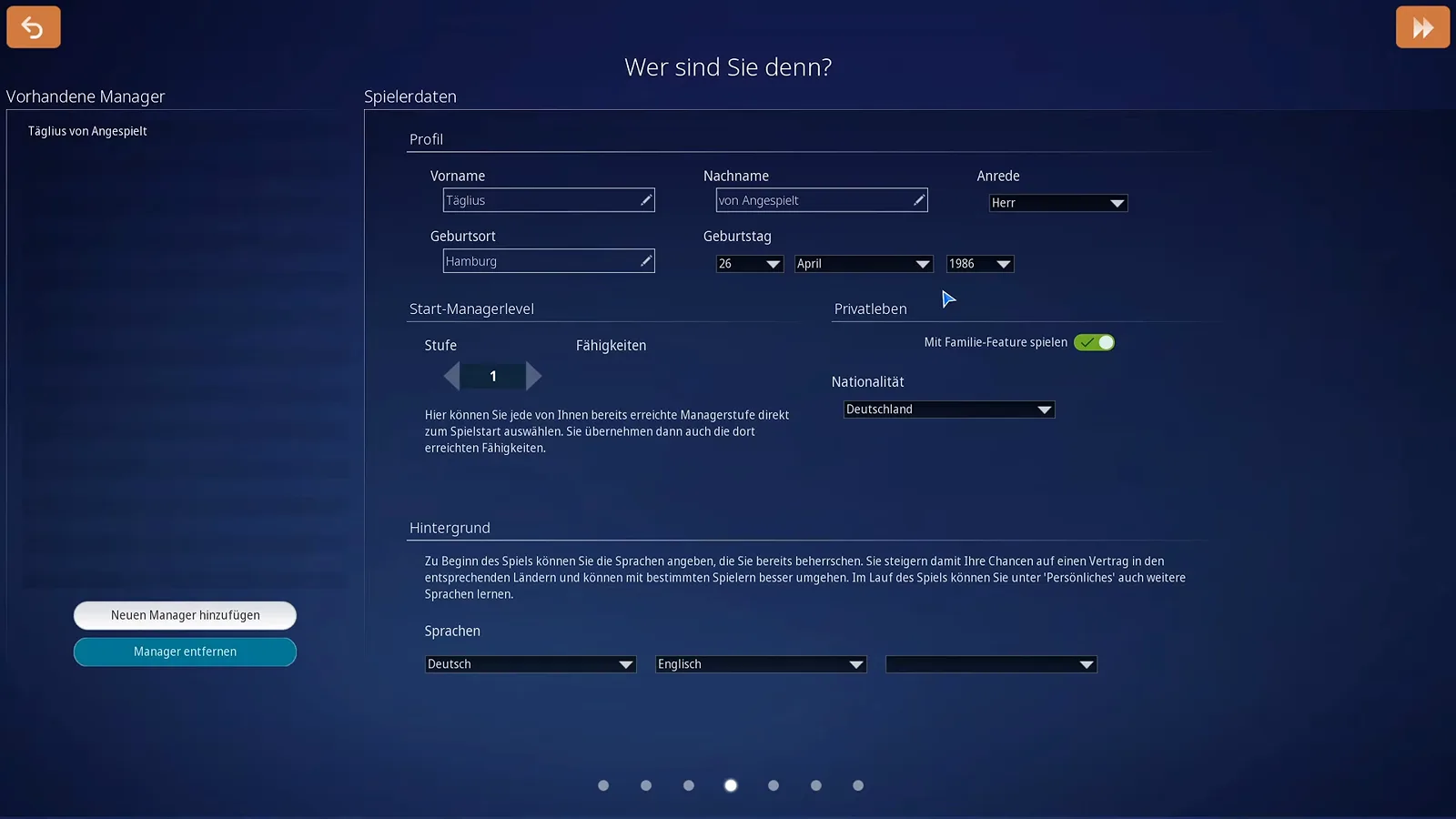
Wer sind Sie denn? builds your in-game person. Name, form of address, birthplace and birthday are flavour, but three fields have mechanics behind them. Start-Managerlevel lets you import any manager level you have already earned in previous careers, abilities included — a fresh install starts you at level 1, and you grow from there. The Mit Familie-Feature spielen toggle under Privatleben decides whether the private-life layer with family, events and your manager’s own household is part of this save; it can be a genuinely engaging layer, and it is equally legitimate to leave it off. Finally, the Sprachen rows state which languages your manager already speaks — German and English cover most career paths — and the screen says outright what that is for: more languages mean better odds at contract offers in those countries and smoother talks with certain players, and you can learn more languages later under Persönliches.
The next wizard screen sets up the household if the family feature is on: you start as a single, and family members can be added from there.
Difficulty: “Was trauen Sie sich zu?”
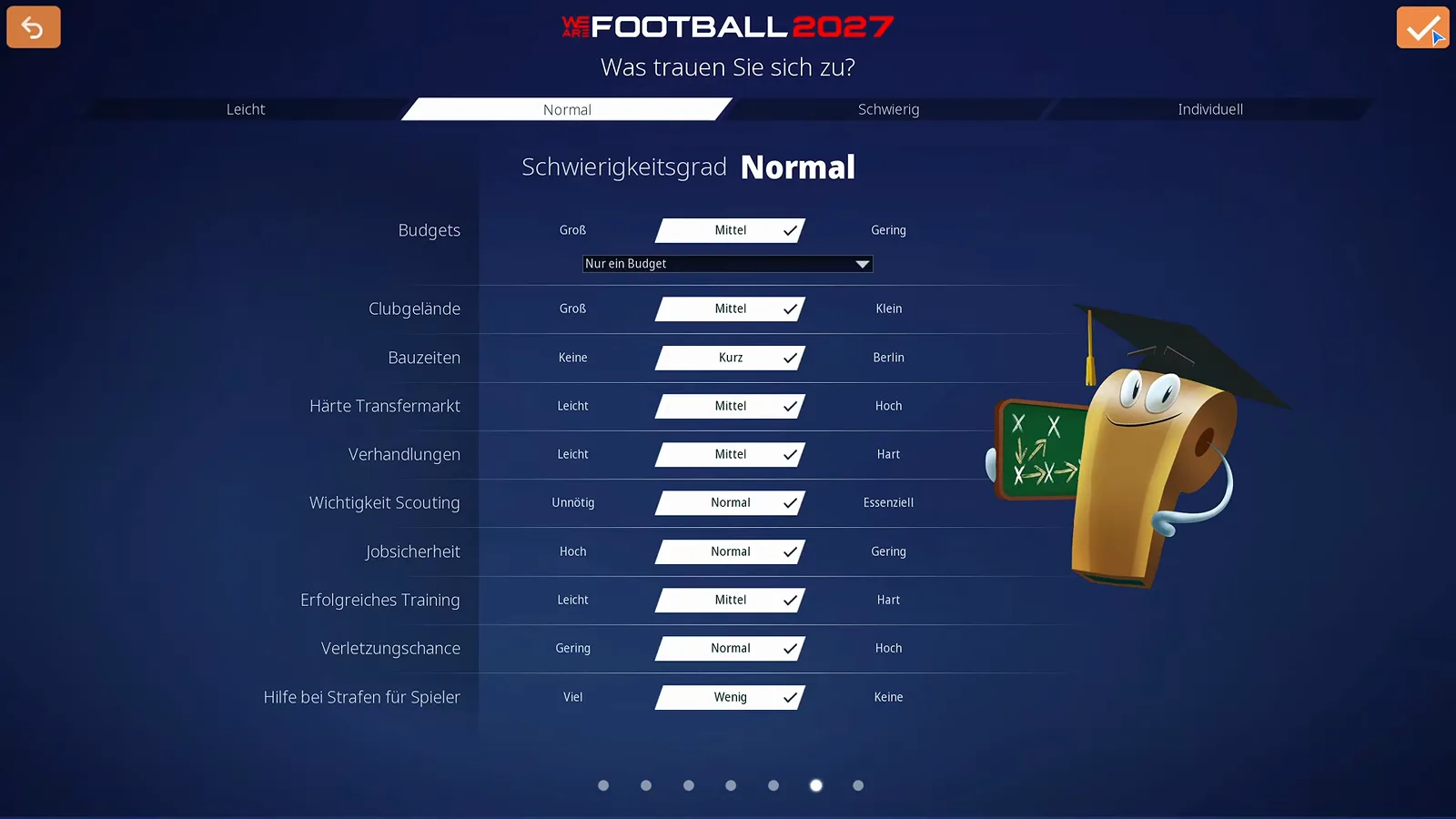
The screen titled Was trauen Sie sich zu? offers four tabs — Leicht, Normal, Schwierig and Individuell — and ten rows that the Normal preset sets for you: Budgets, Clubgelände, Bauzeiten, Härte Transfermarkt, Verhandlungen, Wichtigkeit Scouting, Jobsicherheit, Erfolgreiches Training, Verletzungschance and Hilfe bei Strafen für Spieler. Under Budgets a sub-option decides whether you get one pooled budget or separately ring-fenced pots for transfers and club expenses — the realistic choice, because it stops you from raiding the stadium fund for a striker. The Bauzeiten row even has a joke built in: its slowest setting is labelled Berlin, a nod to the city’s famously delayed airport. Individuell lets you pull any single row toward easy or hard without adopting a full preset, which is the honest way to make your fifth-division rebuild hard without making negotiations punishing. What each of the ten lines actually changes is broken down line by line in the difficulty settings guide. And the tuning does not stop once the save exists: the options screen reopens this exact difficulty screen mid-career and surrounds it with two dozen more switches — the in-game options guide walks every one of them.
Career Path and Your First Club
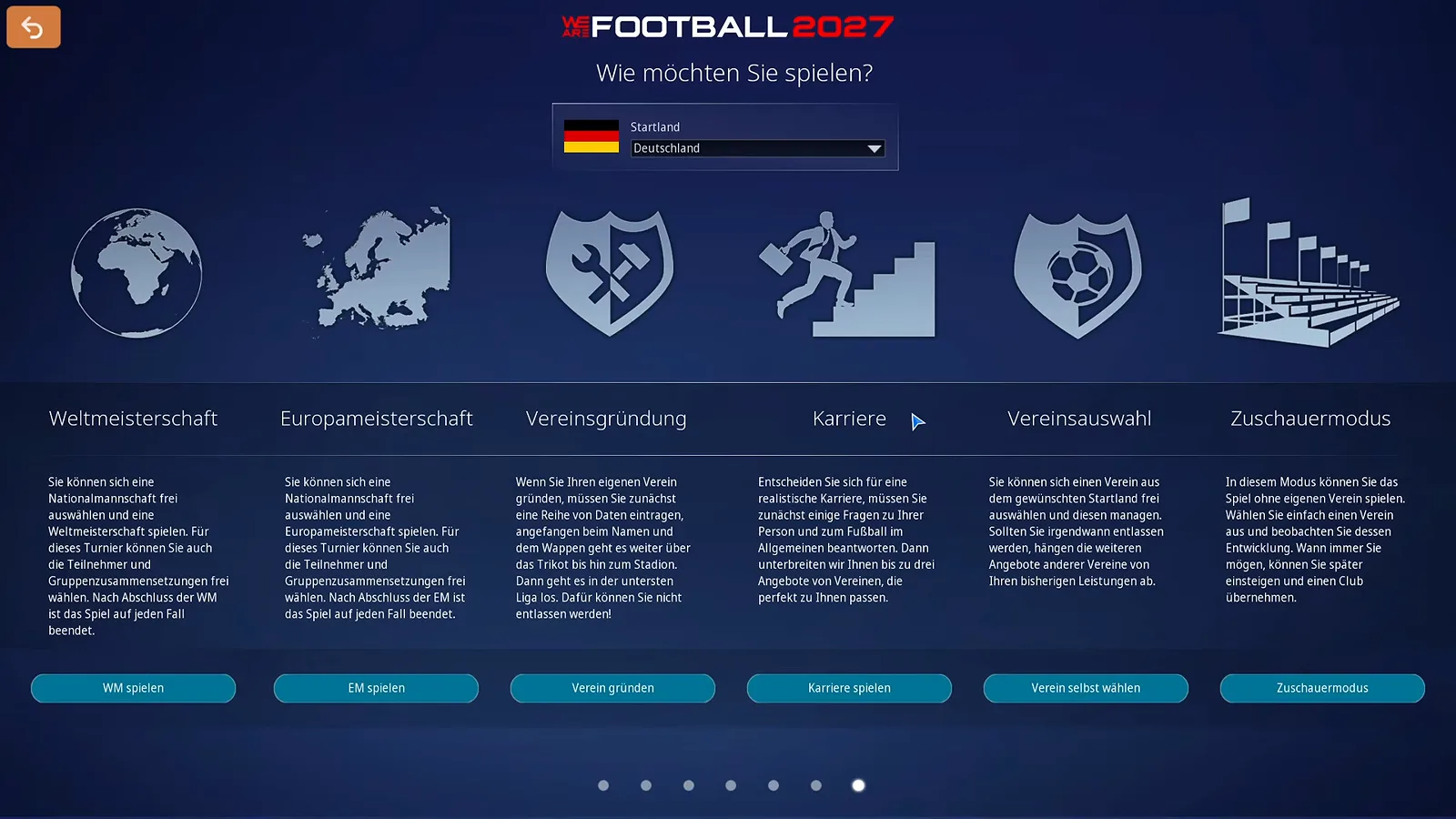
The last wizard step asks Wie möchten Sie spielen? and lays out six careers. Weltmeisterschaft and Europameisterschaft are national-team tournaments. Vereinsgründung builds a club from scratch and drops you into the country’s lowest league — with the twist that you cannot be sacked. Karriere asks a few questions about you and your football preferences and then brings up to three club offers that fit your profile. Vereinsauswahl is the free choice: pick any club in your selected start country. Zuschauermodus watches a single club play out without you managing it. After the club you choose, a contract offer follows — season goal and budget are negotiable here, and the board expectations guide explains how that relationship plays out for the rest of your tenure.
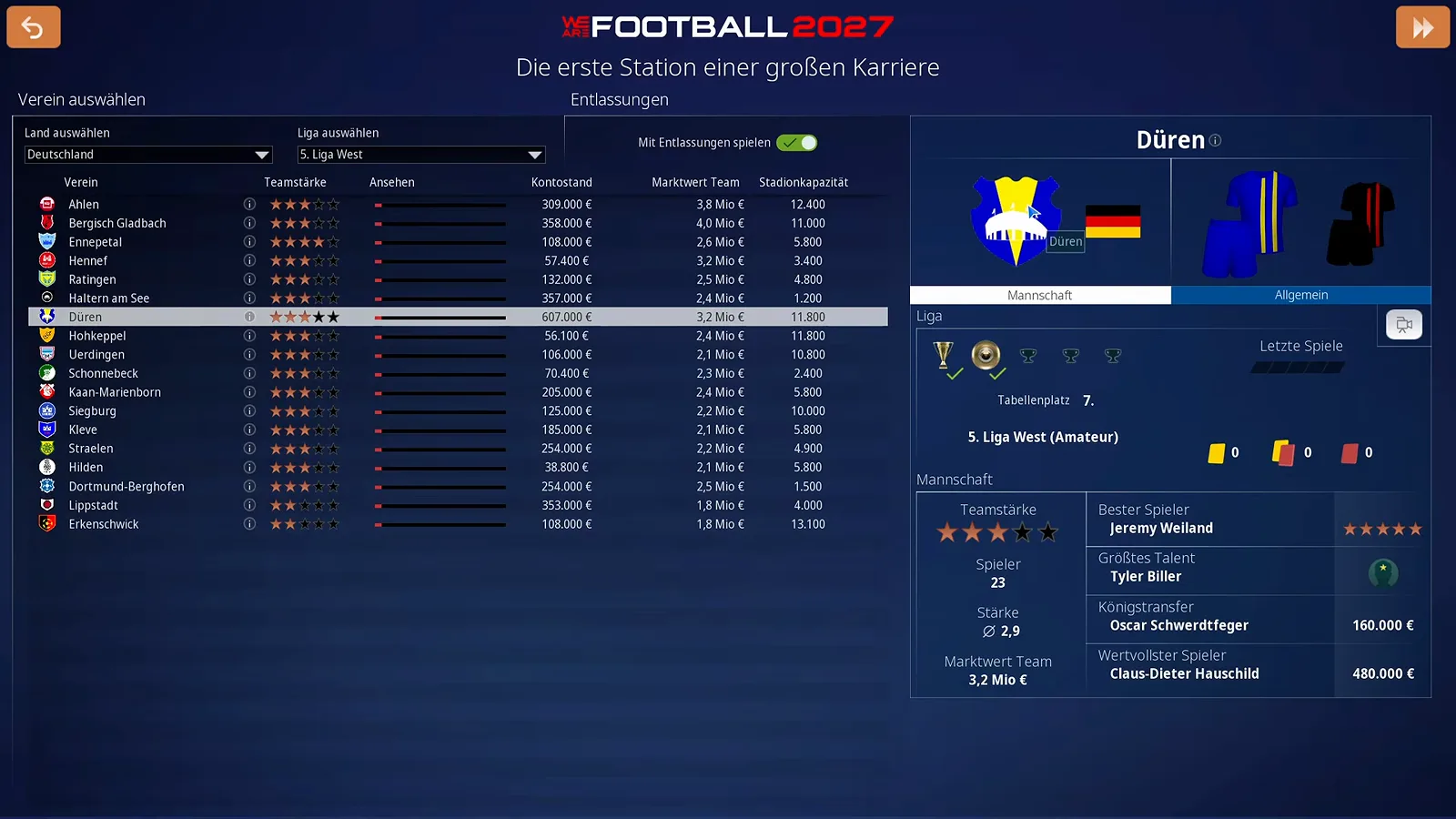
In the Vereinsauswahl table you set Land auswählen and Liga auswählen — Germany down to the 5. Liga West in the source video — and compare clubs by Teamstärke, Kontostand, Marktwert Team and Stadionkapazität before committing. The club card on the right shows the squad’s star player, biggest talent and most valuable player. One toggle up top deserves a deliberate click: Mit Entlassungen spielen decides whether you can actually be sacked. Once you sign, the save begins and the first week lands on your desk — the beginner guide takes over from exactly that point.
Common First-Launch Problems
The clubs have wrong names and fake crests. That is not an installation fault — the game ships without club licenses, by design, at this price. The fix is the community real-name database, and our real-name database patch guide covers where to get it and where the files go. The timing matters, though: the database is locked the moment a save begins, so decide before you start the career, not after.
The screen goes black or flickers on alt-tab. The source video’s presenter fought exactly this while recording and worked around it by forcing the game into windowed mode and back to fullscreen — the Fenster button from the menu icons. It is a two-second reset worth trying before touching drivers.
The menu music is too loud. The crossed-out note icon in the top-right mutes it, and it stays muted.
Where are my saves? Not in the Steam folder: the manual places the game’s saves under Saved Games\We Are Football in your Windows user profile (EN p. 179 / p. 215) — displayed as „Gespeicherte Spiele” on German Windows. Steam Cloud backs up manual saves but skips autosaves and badges since WAF27, so if you plan to experiment with trainers or database edits, the backup routine in our save and backup guide keeps a broken first week from becoming a lost career. And if something on this page refuses to work even after a clean setup — the game or the editor will not start, the save will not load — the troubleshooting and update log separates what Update 1 already fixed from what is still open.
Related Guides
guides
WE ARE FOOTBALL 2027 Team Strength Comparison: Stars, Gauges, Scouting Lists
How to read team strength in WE ARE FOOTBALL 2027: Kader stars, the profile gauge, the pre-match Mannschaftsteile bars and the scouting list for the next fixture.
guides
WE ARE FOOTBALL 2027 Season Planning Guide: Budget Split, Kits and Squad Numbers
The Saisonplanung stretch in WE ARE FOOTBALL 2027 screen by screen: promotion payout, league target, budget split, new kits, club rules and squad numbers.
guides
WE ARE FOOTBALL 2027 Relegation Battle Guide: Escaping the Red Rows
A relegation battle in WE ARE FOOTBALL 2027 screen by screen: the red Verbandsliga table rows, a 0:1 away steal, a 1:4 home defeat and the January deals in between.
Was this helpful?
Thanks for the feedback!